xsukax Ollama WebUI Chat
A modern, privacy-focused web interface for interacting with Ollama AI models. This application provides a sleek, user-friendly chat interface that runs entirely in your browser while connecting directly to your local Ollama installation.
https://github.com/xsukax/xsukax-Ollama-WebUI-Chat-Frontend
Demo: https://xsukax.github.io/xsukax-Ollama-WebUI-Chat-Frontend/
Watch this video on YouTube
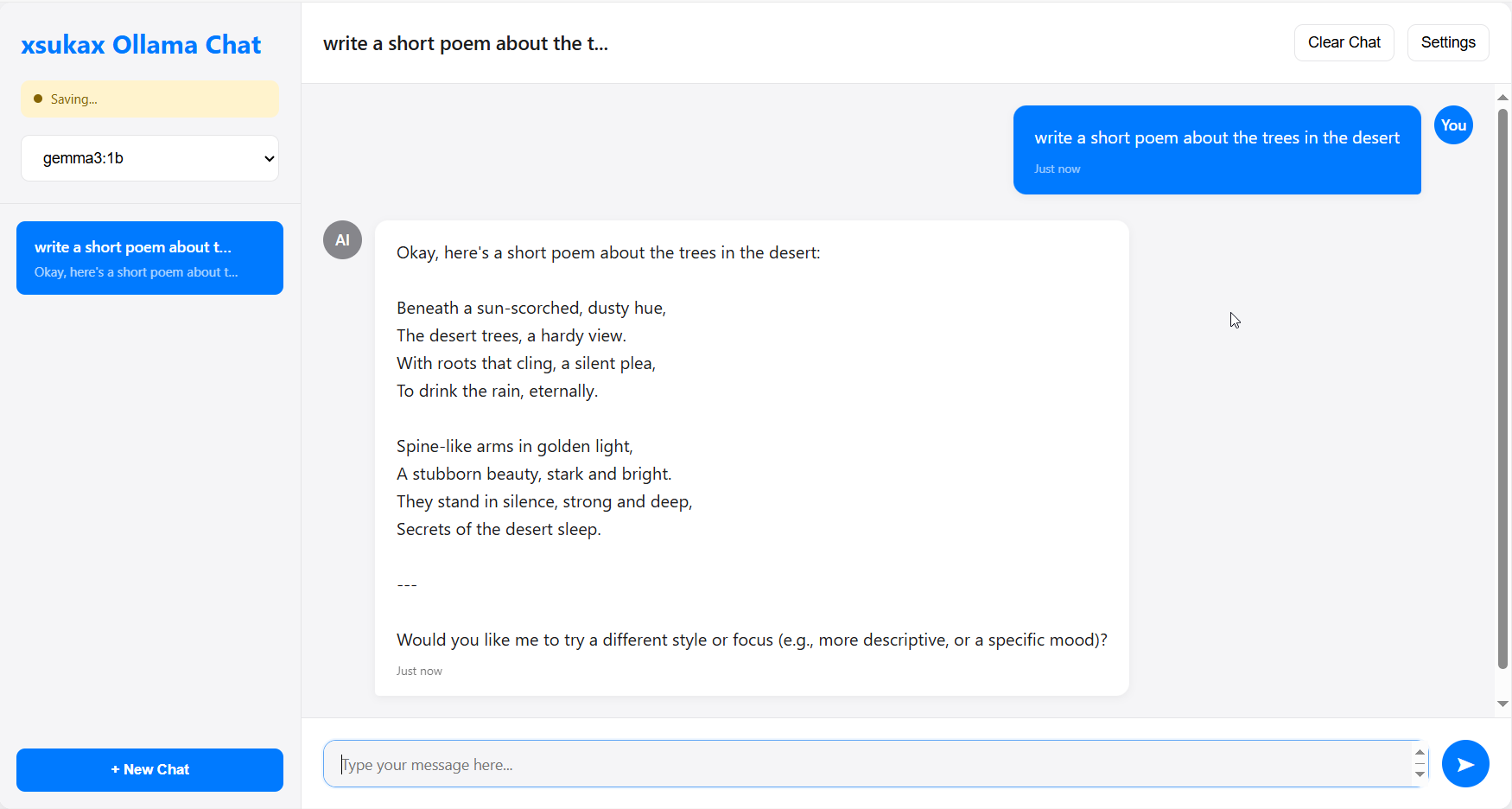
Project Overview
xsukax Ollama WebUI is a comprehensive web-based frontend for Ollama, designed to provide an intuitive chat experience with AI language models. The application offers a complete chat management system with real-time streaming responses, model management capabilities, and persistent conversation history—all while maintaining strict privacy standards through local-only operation.
Key capabilities include:
- Interactive Chat Interface: Real-time streaming conversations with AI models
- Model Management: Download, manage, and remove Ollama models directly from the interface
- Session Persistence: Automatic saving and restoration of chat histories using browser storage
- Multi-Chat Support: Create and manage multiple conversation threads
- Connection Diagnostics: Built-in troubleshooting tools for Ollama connectivity
- Responsive Design: Optimized for both desktop and mobile devices
Security and Privacy Benefits
This application prioritizes user privacy and data security through several key design principles:
Complete Local Operation
- Zero External Data Transmission: All conversations remain on your local machine
- No Cloud Dependencies: No data is sent to external servers or third-party services
- Direct Ollama Integration: Communicates exclusively with your local Ollama installation
Browser-Based Storage Security
- IndexedDB Encryption: Utilizes browser's built-in IndexedDB for secure local storage
- No Server-Side Storage: Chat histories are stored entirely within your browser
- Automatic Data Isolation: Each browser profile maintains separate, isolated data
Network Security
- CORS-Aware Design: Includes comprehensive CORS configuration guidance
- Local Network Only: Designed to operate within your local network environment
- Secure Connection Handling: Validates and secures all API communications
Data Protection Features
- Ephemeral by Design: Data exists only as long as you maintain it locally
- User-Controlled Deletion: Complete control over chat history and data removal
- No Analytics or Tracking: Zero telemetry or usage data collection
Features and Advantages
User Experience Excellence
- Intuitive Interface: Clean, modern design inspired by leading chat applications
- Real-Time Streaming: Live response streaming for immediate feedback
- Smart Auto-Resize: Adaptive input field that grows with your content
- Mobile Responsive: Fully functional on smartphones and tablets
Advanced Model Management
- One-Click Model Installation: Download models directly through the interface
- Progress Monitoring: Real-time terminal output for model operations
- Storage Awareness: Visual feedback on model sizes and disk usage
- Quick Model Switching: Seamless switching between different AI models
Conversation Management
- Persistent Chat History: Automatic saving of all conversations
- Multi-Session Support: Manage multiple conversations simultaneously
- Smart Chat Previews: Quick overview of conversation content
- Conversation Search: Find specific chats through intelligent organization
Technical Advantages
- Single File Deployment: Complete application in one HTML file
- No Installation Required: Runs directly in any modern web browser
- Lightweight Architecture: Minimal resource usage and fast loading
- Offline Capable: Functions without internet connectivity
Installation Instructions
Prerequisites
- Ollama Installation: Ensure Ollama is installed and running on your system
- Download from: https://ollama.ai
- Verify installation:
ollama --version
- CORS Configuration: Configure Ollama to allow browser connections
For Windows:
# Temporary (for current session)
set OLLAMA_ORIGINS=* && ollama serve

# Permanent (requires restart)
setx OLLAMA_ORIGINS "*"
For macOS/Linux:
# Temporary (for current session)
OLLAMA_ORIGINS=* ollama serve

# Permanent (add to ~/.bashrc or ~/.zshrc)
export OLLAMA_ORIGINS="*"
Application Setup
- Download the Application:
# Clone the repository
git clone https://github.com/xsukax/xsukax-Ollama-WebUI-Chat-Frontend.git
cd xsukax-Ollama-WebUI-Chat-Frontend
- Launch the Application:
- Open
index.htmlin your web browser - Or serve via local web server:
# Using Python
python -m http.server 8080

# Using Node.js
npx serve .
- Verify Connection:
- The application will automatically attempt to connect to
http://localhost:11434 - Check the connection status indicator in the sidebar
- Use the "Test Connection" button in Settings if needed
Usage Guide
Getting Started
- First Launch:
- Open the application in your browser
- Check the connection indicator (top-left)
- If disconnected, follow CORS setup instructions
- Model Management:
- Navigate to Settings → Model Management
- Enter model name (e.g.,
llama2,mistral,gemma3:1b) - Click "Pull Model" to download
- Monitor progress in the terminal output
- Starting Conversations:
- Select a model from the dropdown
- Click "New Chat" to create a conversation
- Type your message and press Enter or click send
- Responses stream in real-time
Advanced Features
Chat Management
- Creating Chats: Use "New Chat" button or start typing with a model selected
- Switching Chats: Click any chat in the sidebar to switch contexts
- Deleting Chats: Hover over chat and click the × button
- Clearing History: Use "Clear Chat" to remove all messages from current chat
Model Operations
- Download Models: Settings → Model Management → Enter model name → Pull Model
- Remove Models: Click "Remove" next to any installed model
- Monitor Progress: Terminal shows real-time download/removal progress
Settings Configuration
- Ollama URL: Change if Ollama runs on different port/host
- Temperature: Adjust response creativity (0.0 = focused, 1.0 = creative)
- Top P: Fine-tune response diversity (0.1 = focused, 0.9 = diverse)
Troubleshooting Common Issues
Connection Problems
- CORS Error: Follow CORS configuration steps above
- Port Issues: Verify Ollama is running on port 11434
- Firewall: Ensure local connections are allowed
Model Issues
- Download Failures: Check internet connection and disk space
- Model Not Available: Verify model name at https://ollama.ai/library
- Performance Issues: Consider using smaller models on limited hardware
Data Issues
- Lost Chats: Check if using same browser profile
- Storage Limits: Clear old chats if approaching browser storage limits
- Settings Reset: Re-configure settings if browser data was cleared
System Requirements
Minimum Requirements
- Browser: Chrome 80+, Firefox 75+, Safari 13+, Edge 80+
- RAM: 4GB (depends on selected AI model)
- Storage: 2GB+ available (for model downloads)
- Network: Local network access to Ollama instance
Recommended Specifications
- Browser: Latest version of Chrome, Firefox, or Edge
- RAM: 8GB+ (for larger models like Llama 70B)
- Storage: 10GB+ available (for multiple models)
- CPU: Multi-core processor for optimal model performance
Contributing
We welcome contributions to improve xsukax Ollama WebUI. Please follow these guidelines:
- Fork the repository and create a feature branch
- Test thoroughly across different browsers and Ollama versions
- Maintain code quality and follow existing styling patterns
- Document changes in your pull request description
- Ensure security by avoiding external dependencies where possible
Licensing Information
This project is licensed under the GNU General Public License v3.0 (GPL-3.0).
What this means:
For Users:
- ✅ Free to Use: Use the software for any purpose without cost
- ✅ Free to Modify: Modify the source code to suit your needs
- ✅ Free to Distribute: Share the software with others
- ✅ Access to Source: Full source code is always available
For Contributors:
- 📋 Share Improvements: Any modifications must be shared under the same license
- 📋 Preserve License: Cannot change the licensing terms of the original work
- 📋 Attribution Required: Must maintain original copyright notices
- 📋 No Warranty: Software provided "as-is" without guarantees
For Commercial Use:
- ✅ Commercial Use Allowed: Can be used in commercial environments
- 📋 GPL Compliance Required: Any distributed modifications must remain GPL-3.0
- 📋 Source Code Sharing: If distributed, source code must be made available
The GPL-3.0 ensures this software remains free and open-source while encouraging community contributions and preventing proprietary lock-in.
Support and Community
- Issues: Report bugs and feature requests via GitHub Issues
- Discussions: Join community discussions in GitHub Discussions
- Updates: Watch the repository for updates and new releases
Built with privacy in mind. Powered by your local Ollama installation.